DiroDi Trooper M800 User Manual
1. Scooter Assembly Process
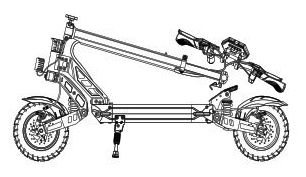
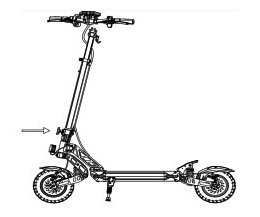
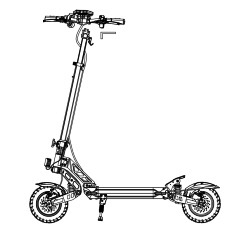
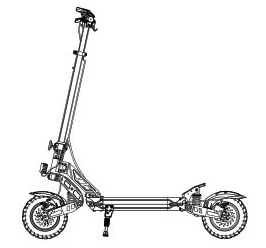
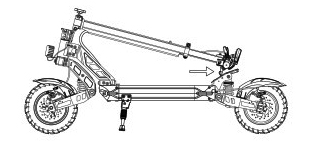
2. Unfolding Process
1. One hand presses the clip, while the other one pulls the main tube up.
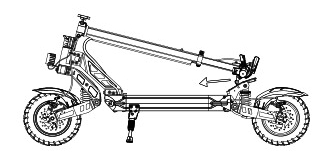
2. Pull the T-bar up.
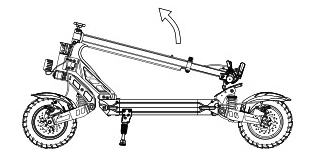
3. After pulling the T-bar up, pull the folding clip up.
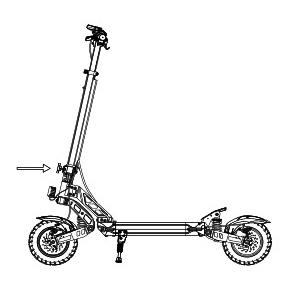
4. Lock the folding clip.
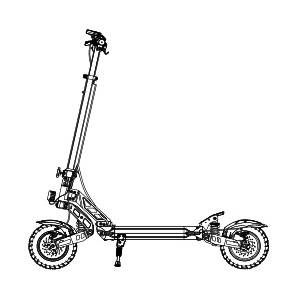
3. Folding Process
1. Pull the safety catch upward.
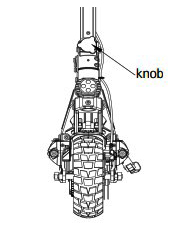
2. Pull the folding buckle outward.
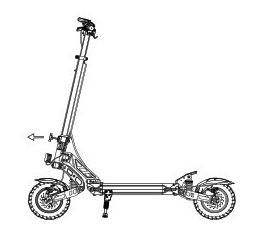
3. Put down the T-bar of the E-scooter.
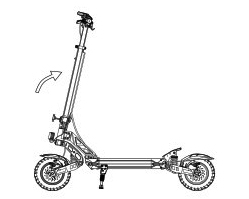
4. Insert the lever hook into the hook card slot.
4. Recharging
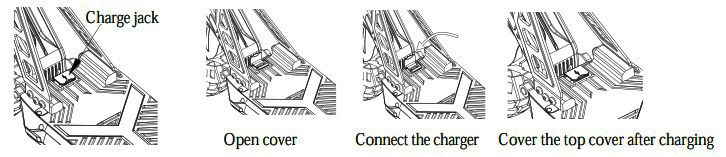
1. Open the waterproof plug of the charging port, then insert the charger plug into the charging port.
2. Plug the charger into the power supply.
3. Red light indicates charging
5. Riding Instructions
IMPORTANT: The laws around the use of electric scooters on public lands, roads and areas vary from state to state. We recommend you always check your local council and road traffic laws prior to using an electric scooter to ensure you are aware of any restrictions that may affect the use of motorized vehicles. Always use appropriate protective riding equipment such as an approved helmet and suitable clothing. This electric scooter is not road legal and can't be used on public roads.
1. This product is designed to be used by one adult only and is not possible to be used by two or more people.
2. Use a helmet and other safety devices (knee pads, etc.) while riding.
3. Don't ride it in unsafe places and don't break traffic regulations.
4. Try learning to ride in an empty place before riding outside.
5. Don't make any dangerous actions when riding or riding with one hand. Keep your feet on the scooter.
6. For your safety, please limit the speed to 25 km/h. Please try to avoid using it at night. If needed, please limit the speed to 15 km/h or less and turn on the headlights.
7. Do not use the scooter when the temperature is lower than -5°C.
8. You must reduce the speed or get off the scooter to pass on rugged terrains.
9. Don't ride it on ground with oil or rice.
10. In order to protect the battery or other electric parts, don't put the scooter into water with a height greater than 4cm and don't spray it with water.
11. In order to avoid unnecessary harm, please don't use it when the weather is bad, such as heavy rain, heavy snow, etc.
12. Adjust the height of the scooter according to your height.
13. Do not ride in bad weather conditions. Keep the scooter away from flammable substances and open sources of fire.
14. Please get off the scooter to navigate through bad terrain conditions.
15. The user should check the limits of use in accordance with the local regulations.
6. Main Indicators Meaning
LED LAMP
- Single click to turn on the lamp
- Lamp indicator is on
- Single click to switch off the lamp
- Lamp indicator is off
Gear Settings:
- First gear
- First gear indicator is on (ECO)
- Second gear
- Second gear indicator is on (D)
- Third gear
- Third gear indicator is on (S)
7. Dashboard Instruction
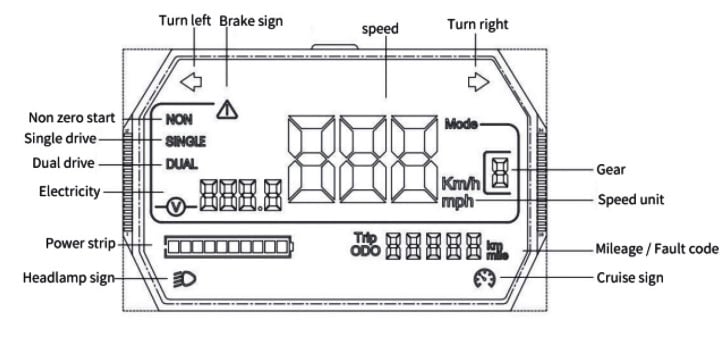
8. Battery and Charger
Each TROOPER-M800 electric scooter is equipped with a special lithium battery and a special intelligent charger. Its accessories have special numbers, please do not use other chargers for charging, as well as other types of products. It is advisable to use our company's charger for charging. If the battery or charger is damaged as a result, the company will not be responsible.
1. Battery
The charger is equipped with an auto-off system when the battery is fully charged. The full charging time is 6-8 hours, except if the battery is damaged as a result of improper charging.
2. Charger
Designed for 800 to 1000 recharges without loss of battery functionality.
9. Riding Operation
Preparation:
a. Choose an open place for riding.
b. Please unfold the E-scooter. Follow the unfolding steps and wear protective equipment before each ride.
1. Turn the key to the right to turn on the power.
2. Stand with one foot on the deck, the other one on the road.
3. While the scooter is sliding, please place your other foot on the deck as well. Meanwhile, press the throttle thumb shifter harder and harder with your right thumb, and the speed will increase.
4. In case of an emergency, hold the brake handles tightly with your hands, and the scooter will stop faster and smoothly.
5. Normally, use your left hand to hold the brake handle, and the scooter will power off and brake in a short time.
10. Operation Instructions
1. Power button
Take the key to the right to turn on the power, then take it to the left to close the power.
2. Gear setting
Click the button on the throttle to switch gears: 1st gear (ECO), 2nd gear (D), 3rd gear (S).
3. Speed control mode
Non-zero starting: The throttle system will start working after the speed reaches 3km/h. Then press the throttle lever smoothly to switch the speed from 1km/h to 25km/h.
4. Brake control
Use your left hand to hold the brake handle. The harder you hold, the faster it brakes. It will provide the fastest braking if you hold the right brake handle at the same time.
5. LED light power button
With the power on, push the light button forward to open the headlights, side lights, and tail lamp. Push the light button back to close all the lights.
6. Cruise control
If you need to use this function, please refer to TROOPER-M800 (function description). When the cruise control function is turned on, the vehicle will automatically maintain the set speed once it is reached. When cruise control is turned on, release the thumb accelerator and the scooter will automatically move forward at a constant speed. If you need to cancel the cruise control, pull the left hand brake handle to activate the electronic brake. To completely stop the cruise control function, please refer to TROOPER-M800 (function description).
7. Zero starting mode
Put one foot on the deck and the other foot on the road, then press the throttle lever downward smoothly. After moving ahead for a distance, put your other foot on the deck as well. Please ride with a speed ranging from 1km/h to 50km/h for each ride.
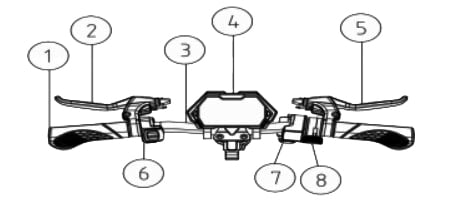
11. Control System Structure
1. Handle bar
2. Left brake handle
3. T-bar
4. LCD display
5. Right brake handle
6. Headlight button
7. Electric lock
8. Gear switch button
12. Button Function
1. Insert the key and turn it to the right to switch on the power.
2. Long press to turn on/off the E-scooter.
3. Press once in a short time to switch to a different gear (default level 1).
4. After startup, press the function switch button three times to enter the menu setting interface.
P1: km/mile - Select Settings, default is km.
P2: Voltage level setting - 36V/48V/52V/60V/72V.
P4: Number of tachometer magnetic poles - range: 1-100, default: 30.
P5: Cruise options - 0 indicates no cruise and 1 indicates cruise.
P6: Zero start, non-zero start settings - 0: zero start; 1: non-zero startup.
P7: Speed limit setting - range: 0-100 percent speed limit.
13. T-Bar Extend and Retract
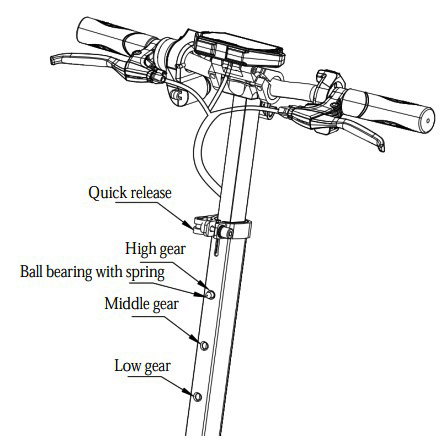
The telescopic gear of the front pole is divided into 3 gears, namely low gear, middle gear, and high gear. Firstly, loosen the quick release, then use one hand to press the ball while simultaneously pressing the T-bar down with the other hand. The height can be adjusted from low to high or high to low in this manner. Finally, lock the quick release into place.
14. Maintenance & Storage
Lubrication:
Folded places need to be lubricated with a few drops of oil or special grease every 6 months. Inspect the scooter every 3 months to ensure all screws are fitting well. If the screws are loose, please tighten them.
Battery:
When you get the electric scooter for the first time, please fully charge the battery before using. The battery should be charged at any time to ensure it has power before using the scooter. Please charge the battery once every three months if you stop using it.
Storage:
Do not expose the scooter to direct sunlight or other damp places for a long time. Keep the scooter clean regularly.
15. General Questions & Solutions
1. Black display
Possible cause: The scooter has been exposed to direct sunlight for a long time.
Solution: Put the scooter in a dark place and cover it for a while.
2. The value displayed does not show the correct information.
Possible cause: Incorrect parameter settings.
Solution: Reset the options.
3. The display is opaque or shows unclear values.
Possible cause: Poor contact connection for the battery or the battery is not charged.
Solution: Switch off the power, recharge the battery, and restart the scooter. If the problem persists, contact DiroDi.
4. Complete diagnosis Please check the following steps if the product isn't working:
A. Check if the power is on.
B. Check if the battery is charged or not.
C. Check if the right and left brakes are properly in place.
D. Check if all connections are properly connected. Please contact DiroDi if the product still isn't working.
16. Error Codes
E-001: Motor Hall fault
E-002: Throttle fault
E-003: Controller fault
E-005: Battery under voltage fault
E-006: Display reception fault
E-007: Display transmission fault